

Request Log
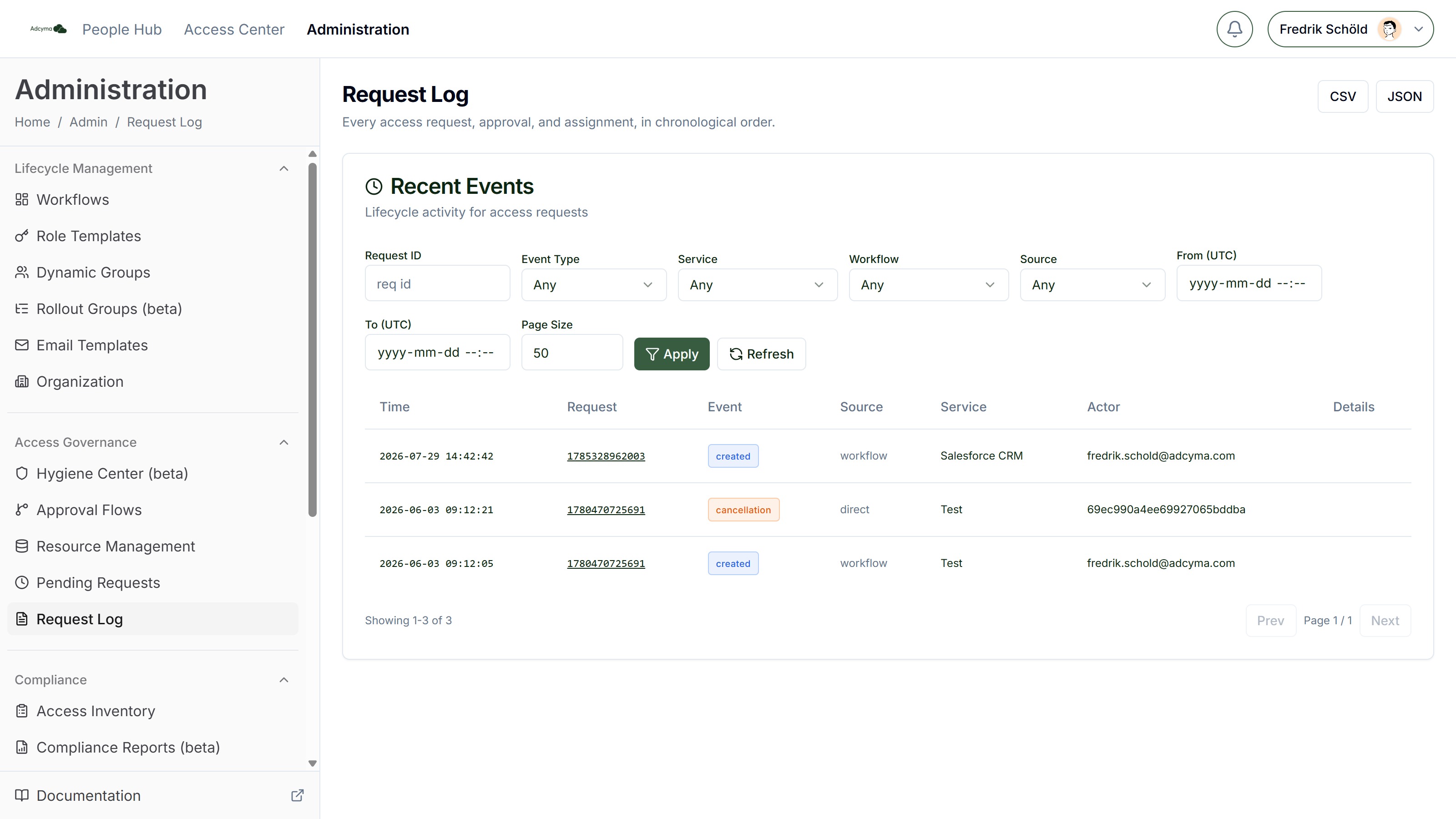
The Request Log is a complete audit trail of all access governance events in your organization: every access request, approval, and assignment, in chronological order.
When to Use the Request Log
- Auditing who requested what and when, for compliance reporting
- Investigating why a particular access request was approved or denied
- Tracking the lifecycle of a specific request from creation to completion
- Reviewing patterns in access requests to improve your approval workflows
Understanding Events
Each entry in the log represents a single event in the lifecycle of an access request. Event types include:
| Event Type | Description |
|---|---|
| Created | A new access request was submitted |
| Approved | An approver approved the request |
| Denied | An approver denied the request |
| Auto Approved | The request was approved automatically (resource has Auto Approve enabled) |
| Auto Approve Failed | An automatic approval attempt failed |
| Stage Approved | One stage in a multi-approver flow was completed |
| Stage Denied | One stage in a multi-approver flow was denied |
| Provisioned | Access was granted (group membership added) |
| Workflow Completed | The full approval workflow finished |
| Finalized | The request reached its final state |
| Cancellation | The request was cancelled before completion |
| Revoked | Access that had already been granted was revoked by the resource owner or an admin |
Each row shows the time, the request it belongs to, the event type, the source (workflow, admin, system, etc.), the resource, the actor, and any details.
Request Drill-Down
Click a Request ID to open the full lifecycle view for that request: the resource, status, requester, justification, original and approved durations, key dates, the workflow it went through, its approval history, and a chronological timeline of every event.
Filtering the Log
Use the filter bar to narrow down results:
- Request ID - Find all events related to a specific request
- Event Type - Filter by a specific event type
- Service - Filter by the resource that was requested
- Workflow - Filter by the approval workflow that processed the request
- Source - Filter by who initiated the event (workflow, admin, system, etc.)
- From / To (UTC) - Limit results to a specific time period
- Page Size - How many events to show per page
Click Apply to run the filters, or Refresh to reload.
Exporting Data
Use the CSV and JSON buttons to download the filtered log for offline analysis or compliance reporting. Exports are capped at 5,000 rows; narrow your filters if you need a specific slice of a larger history.
Best Practices
- Use the Request Log during periodic access reviews to verify that all granted access went through the proper approval process.
- Filter by denied requests periodically to spot patterns. Frequent denials for a specific resource may indicate the resource description or approval flow needs adjustment.
- Export logs before and after major organizational changes (reorgs, new policies) to document the transition.
- Combine Request Log data with Access Inventory data for a complete picture of who has access and how they got it.
Troubleshooting
If an expected event is missing:
- The request may still be in progress. Check Pending Requests.
- Verify the time range filter includes the expected date
- Some events (like provisioning) happen asynchronously and may appear with a slight delay
If you can't find a specific request:
- Use the Request ID filter if you have it
- Try filtering by the resource that was requested