

Micro Reviews
Micro reviews (continuous reviews) are the always-on alternative to a big campaign. Instead of asking a manager to go through 80 items once a quarter, Adcyma sends them a handful every week, riskiest first. Each decision is final on its own, so there is no sign-off and nothing to chase at the end.
They are off until you turn them on.
Turning micro reviews on
The Micro reviews card sits at the top of the Access Reviews page. It shows whether micro reviews are On or Off and, when they're on, a one-line summary of how they run. Click Edit to change the settings.
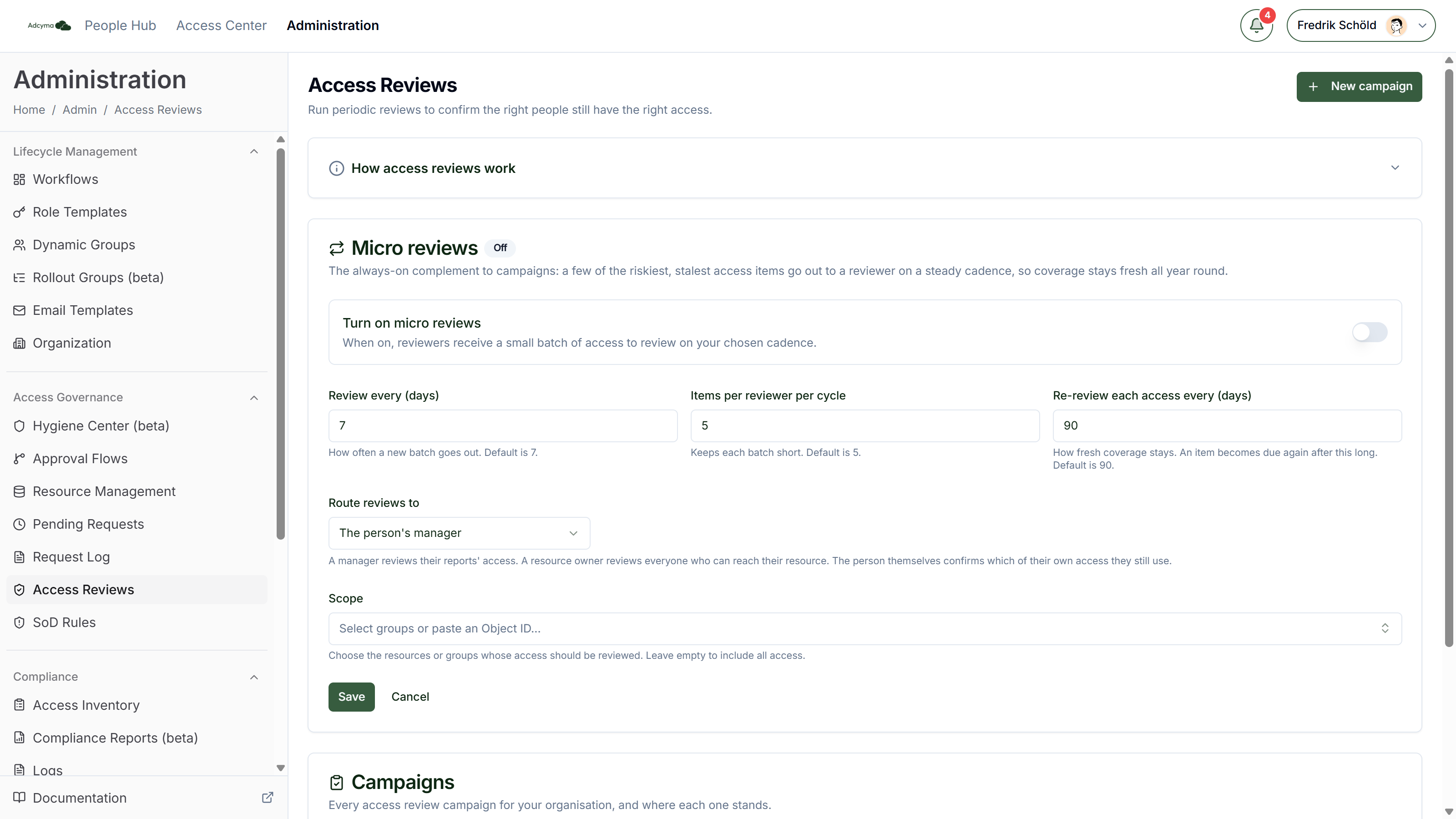
Turn on micro reviews Starts and stops the program.
Review every (days) How often a new batch goes out. Default is 7.
Items per reviewer per cycle The most items a reviewer has open at once. Default is 5. When a batch goes out, each reviewer is topped up to this number, so someone who hasn't touched last week's items doesn't get more piled on.
Re-review each access every (days) How long a kept item stays out of the pool before it comes back for review. Default is 90.
Route reviews to Who reviews each item:
- The person's manager (default). Managers review their reports' access.
- The resource owner. The owner set on the resource in Resource Management reviews everyone who has it.
- The person themselves. Each person confirms which of their own access they still use.
Scope The groups whose access is reviewed. Leave it empty to include everything micro reviews can cover.
Click Save. All fields must be positive whole numbers.
What micro reviews cover
Micro reviews work on access that was granted through Adcyma, such as access people requested and got approved in the Access Center. Group memberships added directly in Entra ID are not in the pool. Use a campaign for those.
An item is skipped, and not sent to anyone, when there is nobody to route it to:
- With manager routing: the person has no manager, or is their own manager.
- With resource owner routing: the resource has no owner.
How a cycle works
On each cycle Adcyma:
- Finds the access in scope that is due for review. Access that has never been reviewed is due straight away.
- Scores each item for risk, the same way a campaign does. See Recommendations and risk signals.
- Tops up each reviewer to the batch size, highest risk first, then oldest first so nothing waits forever.
- Sends each reviewer a notification and an email that links to their Reviews tab in the Access Center.
Reviewers see micro review items in the same inbox as campaign items, marked Continuous. See Reviewing Access.
Decisions are final
A micro review decision closes the item. There is no next stage.
- Keep closes the item and sets the next review for that access to the re-review interval from now.
- Remove removes the access right away and closes the matching grant.
- Not sure is recorded, but closes the item the same way Keep does.
The same rule as in campaigns applies: removing access, or keeping access Adcyma recommended removing, needs a reason.
A manager or resource owner can delegate their micro reviews. A self-review can't be delegated. Only the person whose access it is can answer it.
The Continuous review campaign
The first time micro reviews run, Adcyma creates a campaign called Continuous review to hold the decisions. It shows up in the Campaigns list and never closes. Open it to see every micro review item, its outcome and the decision chain, and to check Reviewer integrity while it's running.
You can't end or delete it from the Campaigns list. To stop micro reviews, switch them off in the Micro reviews card.
Quick check-ins
Separate from micro reviews, people can get Quick check-ins on their My access tab. A quick check-in asks a person to confirm, with a yes or no, that they still need access they requested through Adcyma. Privileged access is checked every 30 days, everything else every 90 days by default. Each person gets at most one batch at a time.
Answering No, I don't need it anymore removes the access right away. Quick check-ins aren't something you can switch on in the portal. If you want them for your tenant, contact us.
Micro reviews or campaigns?
Use micro reviews when you want coverage to stay current all year with a small, steady load on managers. Use a campaign when you need a point-in-time review with a sign-off, for example for an ISO 27001 or NIS2 audit, or when you need to review access that wasn't requested through Adcyma. You can run both: micro reviews in the background, and a campaign once a year for the auditor.