

Billing
The Billing page shows what you pay for, how many seats you use, and when the next payment is due. It is also where you upgrade from the free tier, change your seat count and switch between monthly and annual billing. Only admins can make changes here.
What you see depends on how your organization is billed. Most tenants pay by card through Stripe. Some are invoiced manually by Adcyma, and get a simpler read-only page (see Manual invoicing).
<!-- TODO screenshot: /img/BillingOverview2026.png | URL: https://portal.adcyma.com/administration/billing | Top of the page: the three summary cards and the Current subscription card. READ-ONLY, do not click Update Seats, Annual/Monthly, Upgrade or Manage Plan. -->
The summary cards
Three cards sit at the top of the page:
- Current Plan shows Free or ILM, with badges for any add-on modules (for example + IGA), the billing interval (Monthly or Annual), and Past due or Canceled if either applies.
- Seats shows managed users against your seat limit, for example
112 / 150. Managed users are the members of your managed users group (see Managed Users). - Next Payment shows the amount and date of your next invoice. If you have a seat change scheduled, a note under the amount tells you it already reflects the new seat count.
Free tier and upgrading
New tenants start on the free tier with 25 seats. While you're on it, the Current subscription card shows a Free Tier Active box with how many free seats you're using.
To upgrade:
- Pick Annual or Monthly. Annual is marked Save ~17%.
- Enter the number of seats. The minimum is 25.
- Click Upgrade to Annual Plan (or Monthly Plan). You're sent to Stripe to pay.
If you already manage more users than the seat count you entered, the button raises the count to match and says so, for example "(adjusted for 31 managed users)". You can't buy fewer seats than you already use.
When you come back from Stripe, the page confirms with Subscription activated! If you cancel at Stripe instead, you see Checkout canceled and nothing changes.
Changing seats
On a paid plan, the Seats section of the Current subscription card has a number field and an Update Seats button. The minimum is 25 seats and the maximum is 10,000.
When the change takes effect depends on your billing interval:
| Increase | Decrease | |
|---|---|---|
| Annual | Immediately. The prorated amount for the rest of the year appears on your next invoice. | At renewal. You keep paying for the current seat count until then. |
| Monthly | On the next billing date | On the next billing date |
The page tells you which one happened. An immediate change shows Seats updated immediately. A later one shows Seat change scheduled with the date.
Scheduled seat changes
While a seat change is waiting, an amber Scheduled Change box under the seat field says how many seats you'll have and from which date. The Next Payment card and the Current Details list both show the scheduled count too.
If you submit another seat change before the date, it replaces the scheduled one. Once the new period starts, the scheduled note disappears on its own.
On an annual plan with a switch to monthly billing already scheduled, seat increases are scheduled too. They take effect together with the interval change at renewal.
Expand How seat changes work in the green Subscription & Billing box for the same rules applied to your own renewal date.
Switching between monthly and annual
On a paid plan, the Billing: toggle next to the Current subscription heading switches the interval. Both directions ask you to confirm first.
Monthly to annual happens immediately. The dialog says a prorated charge for the rest of the annual period will appear on your next invoice. If you had a seat change scheduled, the dialog warns that it will be cancelled, so set your seats again after the switch if you still want the change.
Annual to monthly is scheduled for the end of your current annual period. The dialog shows that date and says no charges or credits are issued now. Until then you'll see a Scheduled Change box saying "Billing will switch to Monthly on" the date.
You can't change the interval on a subscription that is already set to cancel at the end of the period.
<!-- TODO screenshot: /img/BillingSwitchIntervalDialog.png | URL: https://portal.adcyma.com/administration/billing | Click the non-active Annual/Monthly toggle to open the "Switch to ... billing?" confirmation, screenshot, then click Cancel. Never click the confirm button. Skip if the tenant is on the free tier. -->
Modules and line items
Add-on modules such as Identity Governance are turned on and off on the Add-ons page. The Active modules card on the Billing page lists what you have and links there with Manage add-ons.
If your subscription has more than one product on it, a Subscription Line Items box lists each one:
- Base Plan with your interval, seat count and price per seat
- One line per module, for example IGA Module, with its seat count and price per seat
Modules are billed per seat on the same interval as the base plan. When the next invoice has more than one line, the Payment details card also shows a Breakdown of the amounts.
Payment details and invoices
The Payment details card shows the card on file (brand, last four digits, expiry), the next payment date and the next amount. Update payment method opens the Stripe billing portal. So does Manage Plan at the top of the Current subscription card.
Recent payments lists your latest invoices with date, invoice number, amount and status. Each one has a View link to the hosted invoice and a PDF link. If the list is empty, the invoices are still in the Stripe billing portal; use View in Stripe Portal.
When a payment fails
If Stripe can't charge your card, a red banner appears at the top of the Billing page: Payment failed. Action required. Click Update payment method in the banner to fix the card in the Stripe portal. The Current Plan card also shows a Past due badge.
Stripe retries the payment. Once a payment goes through, the banner and badge disappear. If the subscription ends up cancelled, your tenant goes back to the free tier with 25 seats and no add-on modules. Anything above 25 managed users then blocks new users from being added until you upgrade again.
Seat limit warnings
As you get close to your limit, a banner appears at the top of every page in the portal, and admins get a notification in the bell. Some levels also send an email to your admins.
| Usage | Free tier | Paid plan |
|---|---|---|
| Amber banner you can close | 80% | 85% |
| Amber banner plus an email to admins | 90% | 95% |
| Red banner that can't be closed | 95% | Not used |
| User limit reached: red banner plus an email | 100% | 100% |
Each email goes out once per level, not every time the banner shows. The emails start again only after usage has dropped below 80% of the limit.
At 100%, Adcyma stops creating new users, including from imports and the API, until you raise the seat limit. Existing users keep being managed. The banner's Increase Limit button brings you here.
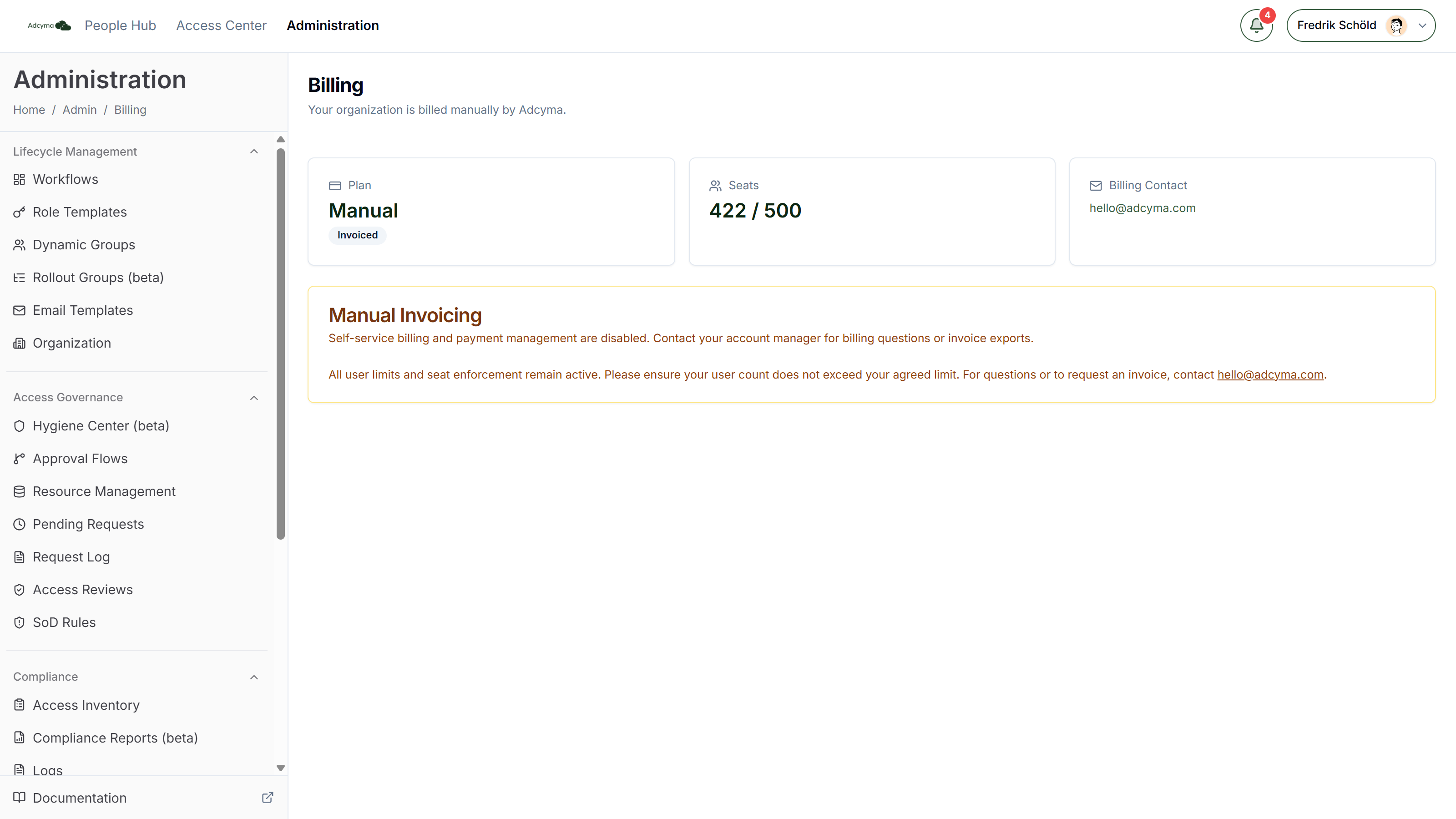
Manual invoicing
Some organizations are billed by Adcyma on invoice instead of by card. For them, the Billing page shows:
- Plan: Manual, with an Invoiced badge
- Seats: managed users against your agreed limit
- Billing Contact: hello@adcyma.com
Self-service billing is turned off, so there are no seat, interval or payment controls. To change your seat count or get a copy of an invoice, contact your account manager or hello@adcyma.com. Your seat limit is still enforced the same way as on a card-paid plan.
Troubleshooting
The plan shows Past due. Update your payment method from the banner. The status clears when Stripe gets a successful payment.
New users aren't being created. Check the Seats card. If you're at your limit, increase it here. On a monthly plan the higher seat count is billed from the next billing date.
My seat decrease didn't take effect. On an annual plan, decreases are scheduled for renewal. Look for the Scheduled Change box.
I need a copy of an invoice. Use the PDF link under Recent payments, or email hello@adcyma.com.