

Preferences
The Preferences page controls how Adcyma formats usernames, display names, and email addresses for new users, along with a few tenant-wide behavior settings. These settings keep identities consistent and aligned with your naming conventions and email policies.
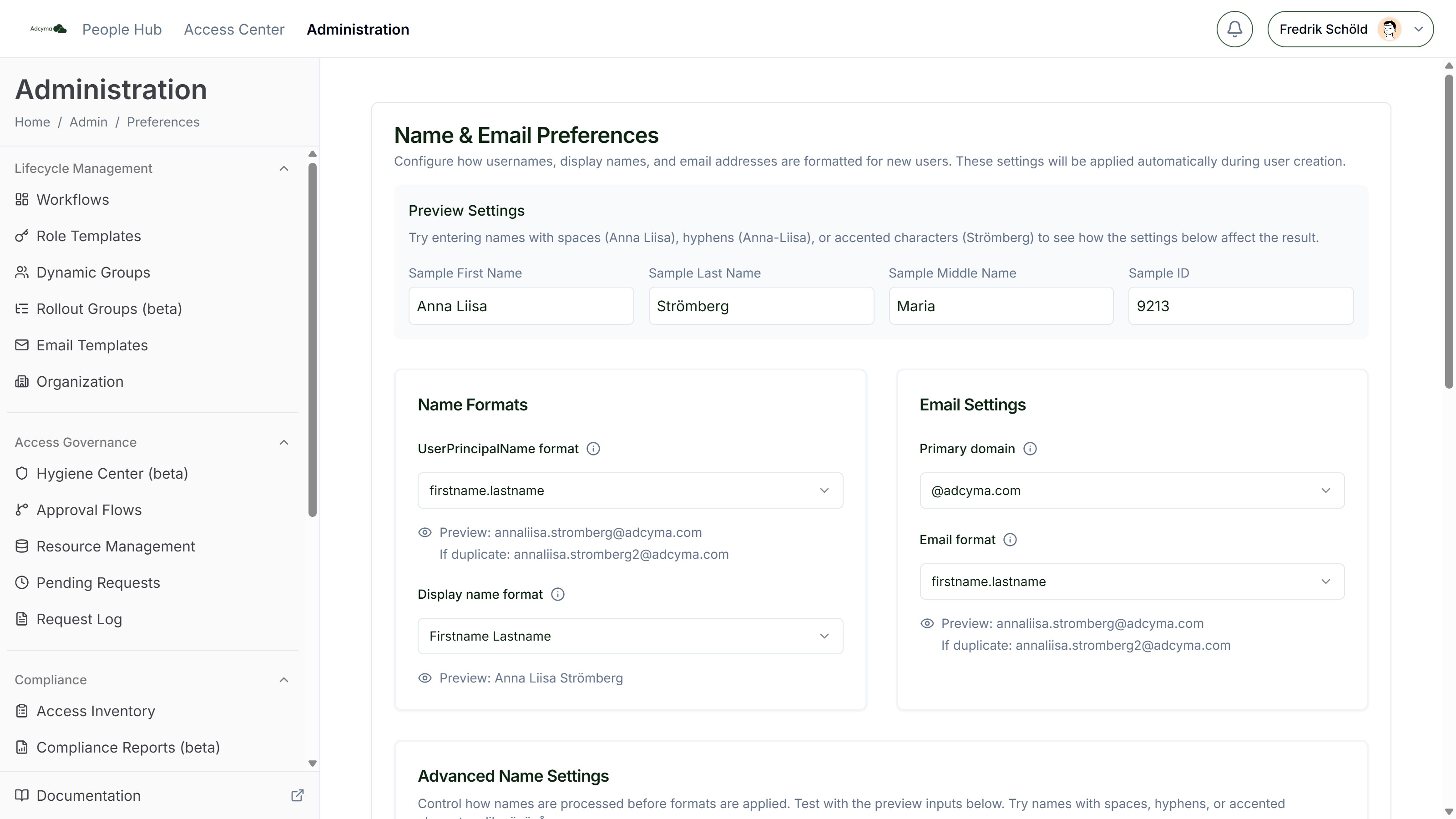
Formatting preferences only apply to newly created users and will not modify existing user accounts. Current users keep their existing UPN, email, and display name until manually updated.
Name Formats
UserPrincipalName format How the primary login identifier is structured. Options include firstname.lastname, flastname, firstnamel, firlas, fila, and ID-based formats.
Display name format How user names appear in the system: Firstname Lastname, Lastname Firstname, Lastname, Firstname, F Lastname, or Firstname L.
Email Settings
Primary domain The domain used when generating email addresses and UPNs for new users, selected from the domains available in your directory configuration.
Email format How email addresses are constructed, with the same format options as the UPN.
Advanced Name Settings
Fine-grained control over how names are processed before formats are applied:
- Whitespace in Names - Remove spaces (maryjane), replace with hyphen (mary-jane), use first part only (mary), or use last part only (jane)
- Special Characters - Standard transliteration (ö → o, ä → a, å → a) or extended (ö → oe, ä → ae, å → aa)
- Hyphens in Names - Remove hyphens (annaliisa) or keep them (anna-liisa)
- Duplicate Names - How conflicts are resolved when two users would generate the same UPN or email: append a number (john.smith2), append with a dot (john.smith.2), or use the middle initial (john.m.smith)
Preview Settings
Enter a sample first name, last name, middle name, and ID to see the generated UPN, display name, and email in real time, including what happens on a duplicate. Try names with spaces, hyphens, or accented characters to verify your advanced settings behave the way you expect.
Click Save Changes to apply. Changes affect new users only.
New User Accounts (Hybrid Tenants)
If your tenant runs in Hybrid mode (Active Directory + Entra ID), an additional card lets you choose which directory new user accounts are created in by default: Active Directory or Entra ID. Accounts created in Active Directory sync to Entra ID through Entra Connect. See Identity Provider for directory modes.
Protected Groups
Protected Groups are groups that the "Remove from All Groups" workflow action will never remove a user from. Use this to safeguard memberships that must survive offboarding automation, such as the Adcyma managed group itself or litigation hold groups.
Add groups from the picker or paste a raw object ID. Changes to this list are saved automatically.
Tips
Set these preferences early in your Adcyma deployment so all new users follow consistent naming patterns from the start. Make sure the formats you choose work with your existing email domains and directory structures, and that they'll still make sense as your organization grows.