

Workflows
A workflow decides what Adcyma does when someone joins, changes role or leaves. It has one trigger, optional conditions, and the steps to run. Adcyma only does what your workflows say. If no active workflow with a Create User step matches a new employee, no account is created.
Important: Workflows start from requests made in Adcyma: the New Employee, Edit Employee and Employee Leaving forms in the People Hub, the API, and CSV import. Changes made directly in Entra ID or Active Directory don't start a workflow.
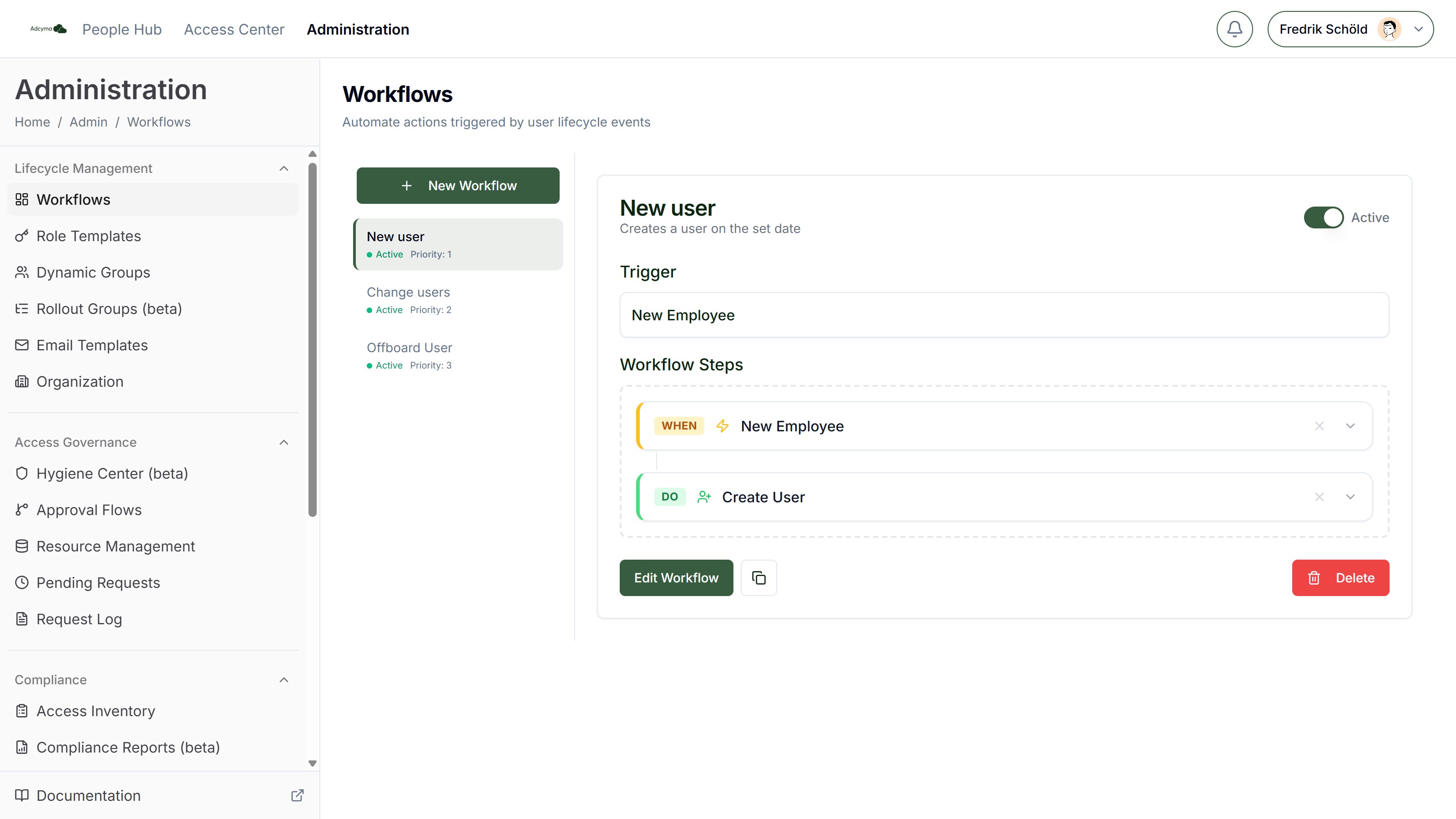
This page covers how workflows are built and how they run. Every step and its options are described in Workflow Actions.
Page Layout
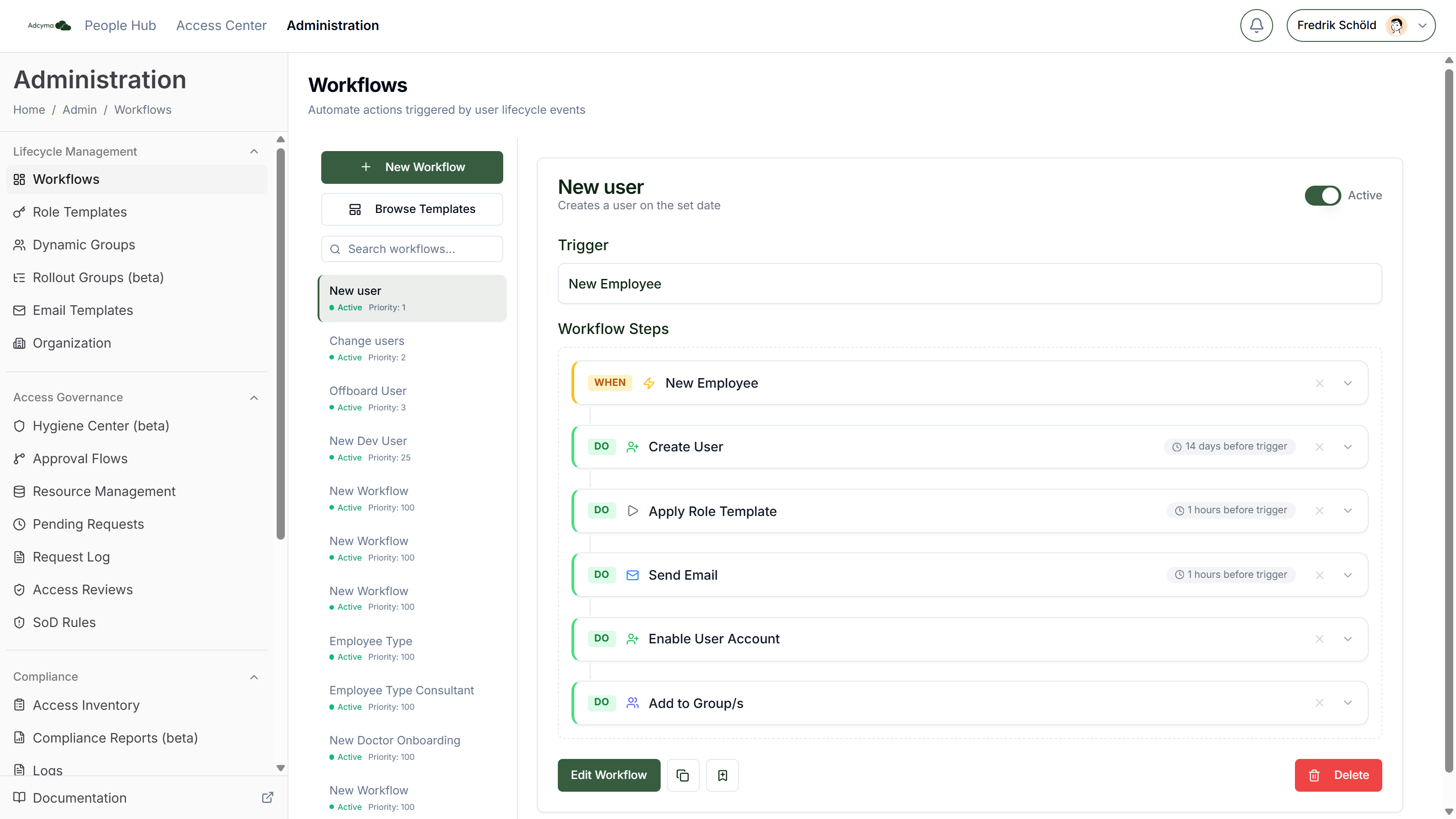
The sidebar has New Workflow, Browse Templates, and a search box once you have more than three workflows. Each workflow in the list shows its name, Active or Inactive, and its priority number.
Select a workflow to see it as a chart: a WHEN block for the trigger, IF blocks for conditions and DO blocks for steps. Steps with a delay show it, for example "2 days after trigger". Below the chart you have:
- Edit Workflow to open the editor
- The copy icon to duplicate the workflow
- The bookmark icon to save it as a template (only on saved workflows)
- Delete
The Active switch sits in the workflow header.
Building a Workflow
- Click New Workflow, or start from a template with Browse Templates (see Workflow Templates).
- Give the workflow a name, pick a Priority and, if you want, a description.
- Click Choose a trigger... and pick one.
- Add steps from the Add a step panel on the right. It lists conditions first, then actions grouped by area (Email, Groups, Mailbox, Security, Storage, User Management and Other). Use the search box to find one. The panel stays greyed out until you have picked a trigger.
- Fill in each step. Required fields are marked with a red asterisk. Everything else is under Show advanced options.
- Click Save Workflow. The button stays disabled until the workflow has a name, a trigger and at least one step.
Triggers
Each workflow has exactly one trigger. The trigger also sets the date and time that step timing counts from.
| Trigger | Starts when | Timing counts from |
|---|---|---|
| New Employee | Someone is added through the New Employee form, the API or CSV import | The start date |
| Employee Change | Someone is edited through the Edit Employee form or the API. Reports who get a new manager when their manager leaves or moves also get an Employee Change each. | The change date |
| Employee Leaving | Someone is offboarded through the Employee Leaving form or the API | The leaving date, at 17:00 if no time is given |
Conditions
Conditions decide whether the workflow applies to the person in the request. A workflow without conditions applies to everyone with that trigger.
- Every condition must match. There is no OR. To cover Sales or Marketing, make two workflows, or one workflow per department.
- Conditions check the request, not the directory. Adcyma compares against what was entered in the form or sent through the API for this change.
- Matching is exact and case-sensitive. "Sales" does not match "sales". This is stricter than Dynamic Groups, which ignore case. Pick values from the picker so they match how they're stored.
| Condition | Field | Matches when | Works on |
|---|---|---|---|
| Job Title is | Job Title (picker of job titles in your directory) | The job title is exactly this value | All triggers |
| Department is | Department (picker) | The department is exactly this value | All triggers |
| Office location is | Location (picker of your offices) | The office is exactly this value | See the known issue below |
| Employee is Manager | None | The person has direct reports | Employee Change, Employee Leaving |
| Reports to Manager | Manager Id (picker of managed users) | The person's manager is the user you picked | Employee Change, Employee Leaving |
| Country is | Country (list of countries, stored as a two-letter code such as SE) | The country in the request is the same code | New Employee, Employee Change |
| Preferred Language is | Language (list of languages, stored as a code such as sv-SE) | The preferred language is the same code | New Employee, Employee Change |
| Employee type is | Employee Type (typed text) | The employee type is exactly this value, for example Contractor | New Employee, Employee Change, when the form sent an employee type |
- Employee Leaving requests only carry the person's name, job title, department, manager and whether they have direct reports. Country, language, employee type and office conditions never match on that trigger.
- Employee is Manager never matches on New Employee. Someone who hasn't started has no reports yet.
- Known issue: Reports to Manager doesn't match on New Employee, and Office location is doesn't match on any trigger in the current release. Until that is fixed, route by Department is or Job Title is, or use a Dynamic Group for office-based access.
Timing
Every action step has a timing control:
- Run immediately runs the step at the trigger's date and time.
- Delay by... runs it a number of hours, days or weeks after.
- Run before trigger... runs it a number of hours, days or weeks before. Use it to create an account a week before the start date, for example.
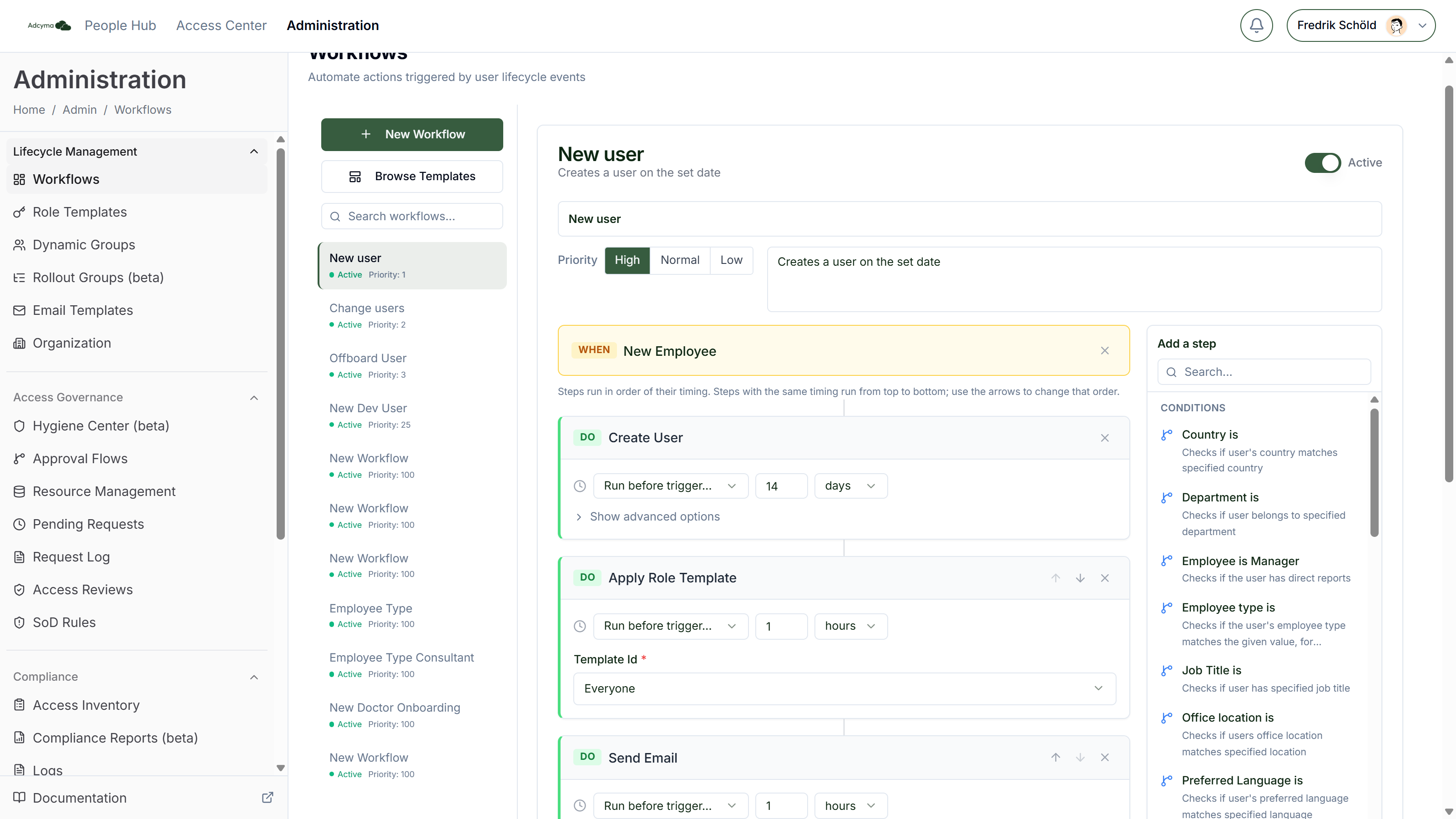
The editor sorts steps by timing. Conditions always sit at the top. When two steps next to each other run at the same time, they run from top to bottom, and arrows appear on the step header: Run before the step above and Run after the step below. Use them to make sure, for example, that Remove from All Groups runs before Apply Role Template.
Priority
Priority has three buttons: High, Normal and Low. They store the numbers 25, 100 and 250, and the sidebar shows the number. A lower number means a higher priority.
Priority matters when more than one workflow matches the same request. See When several workflows match. Templates install with their own number, 500 or 1000, which the editor shows as Low. Clicking one of the buttons replaces that number.
How Workflows Run
- Someone saves a request, for example a new employee starting on 3 March.
- Adcyma finds every active workflow with that trigger, lowest priority number first.
- For each one it checks the conditions. Workflows that don't match are left out.
- The steps from all matching workflows are combined into one plan. Duplicates are removed, see below.
- Each step becomes its own task, scheduled at the trigger date plus or minus its timing. The tasks show up in the People Hub task queue.
The plan is made once, when the request is saved. Editing or turning off a workflow afterwards doesn't change steps that are already scheduled.
When several workflows match
Adcyma combines the steps of all matching workflows instead of running each workflow separately.
Some steps only make sense once per person. For these, only the copy from the highest-priority workflow runs, with that workflow's settings and timing:
- Create User
- Delete User
- Disable User Account
- Enable User Account
- Reset Password
- Revoke All User Sessions
- Convert to Shared Mailbox
All other steps run once per distinct setting. Two workflows that add different groups both run. Two workflows that send the same email template send it once, at the timing of the higher-priority workflow.
An example: your baseline offboarding workflow deletes the account 30 days after the leaving date, at priority 1000. A second workflow for the Finance department deletes it after 7 days, at priority 500. For someone leaving Finance, only the 7-day Delete User runs. Everything else from both workflows still runs.
If two matching workflows have the same priority number, which one wins is not defined. When it matters, give them different priorities.
When a step fails
Steps are independent. A failed step doesn't stop the others in the plan, so check the whole task when something goes wrong.
Adcyma retries a failed step up to five more times, 1, 5, 15, 30 and 60 minutes apart. Errors that a retry can't fix, like a missing permission, fail straight away. A step that has failed for good marks the task Needs attention in the People Hub, with a Retry button that runs only that step again. You also get a notification, see Notifications.
A step can also be Skipped. This happens to a Send Email step when its only recipient is an empty variable, typically {{ manager_email }} for someone without a manager. The rest of the plan carries on as normal.
Active Directory and Hybrid
What the editor offers depends on your directory mode, set under Identity Provider.
Entra ID only. Every step is available.
Active Directory only. The editor hides steps that need Microsoft 365, and says so in the Add a step panel. You can use Create User, Update User Profile, Disable User Account, Enable User Account, Delete User, Reset Password, Add to Group/s, Remove from Group/s, Remove from All Groups, Apply Role Template and Remove Role Template. Send Email is not available either. Templates that use other steps are marked Not available for Active Directory companies in the gallery.
Hybrid. Every step is available, and Adcyma picks the directory per step:
- Create User gets a Create user in setting: Company default, Active Directory or Entra ID. The company default is set under Preferences. Accounts created in Active Directory reach Entra ID through Entra Connect.
- Account steps (update, disable, enable, delete, reset password) go to the directory the user lives in.
- Group steps are split per group. Entra groups are changed through Microsoft Graph, Active Directory groups through the agent, in the same step.
- Mailbox, OneDrive, calendar and session steps always go to Microsoft 365.
Steps that go to Active Directory are handed to the AD agent. The task waits until the agent confirms the change.
Workflow Templates
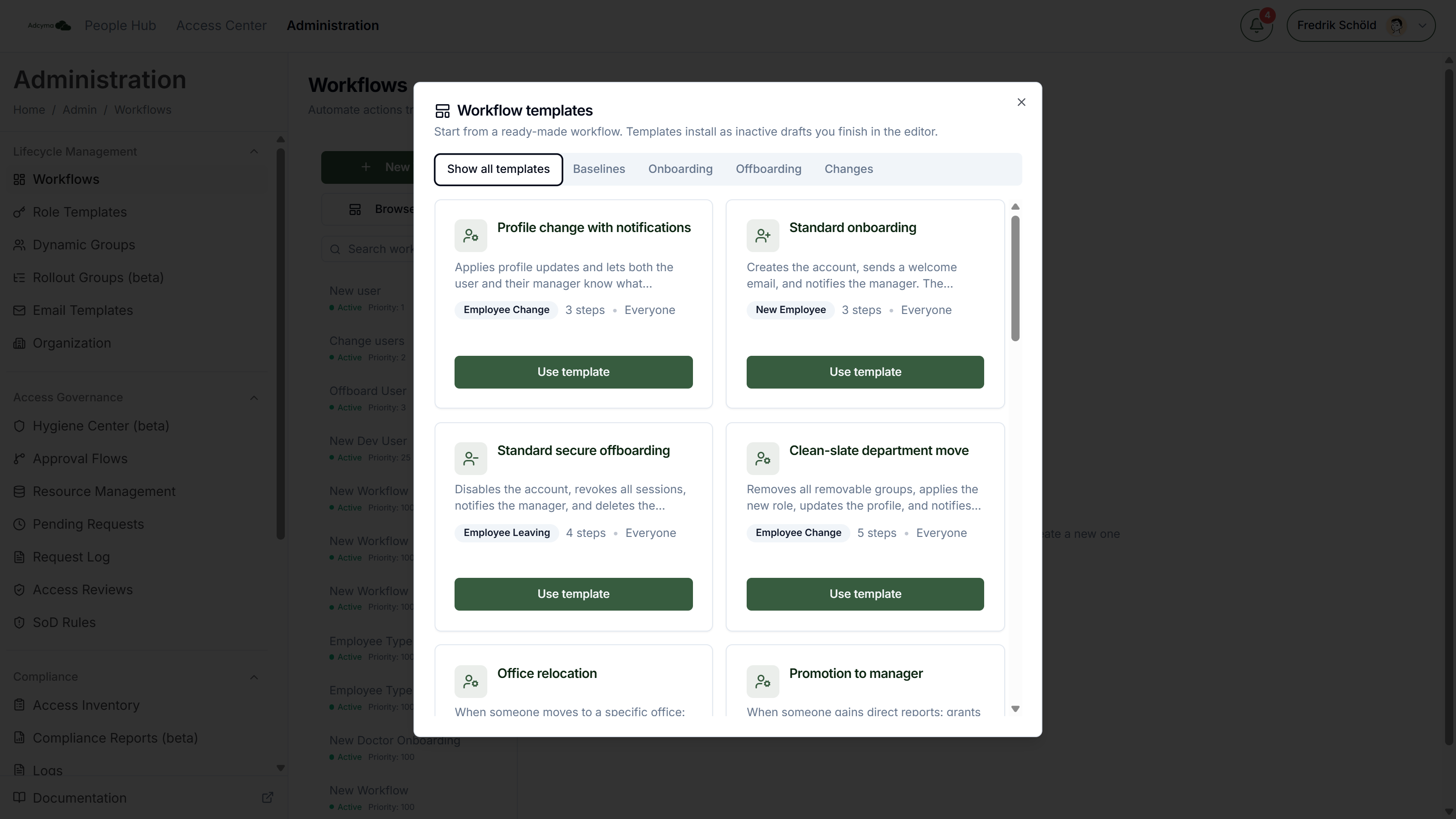
Click Browse Templates to open the template gallery. Templates install as inactive drafts, so nothing runs until you have filled them in and turned them on.
Browsing
The gallery has the tabs Show all templates, Baselines, Onboarding, Offboarding and Changes, plus Your templates once your company has saved one. Each card shows the template's name, description, trigger, number of steps and who it applies to. Some cards have a note in amber, for example a reminder to give the workflow a lower priority number than your baseline.
Start with the baselines. They apply to everyone. The other tabs add routed workflows on top, for one department, office or job title at a time.
| Template | Trigger | Steps | You fill in |
|---|---|---|---|
| Standard onboarding | New Employee | Create User, two Send Email | Welcome and manager email templates |
| Standard secure offboarding | Employee Leaving | Disable User Account, Revoke All User Sessions, Send Email, Delete User after 30 days | Manager email template, retention delay |
| Profile change with notifications | Employee Change | Update User Profile, two Send Email | User and manager email templates |
| Department starter pack | New Employee | Department is, Add to Group/s | Department, groups |
| Team access | New Employee | Reports to Manager, Add to Group/s | Manager, groups |
| Manager onboarding | New Employee | Employee is Manager, Add to Group/s, Send Email | Groups, email template |
| Executive onboarding | New Employee | Job Title is, Apply Role Template, Set Calendar Permissions | Job title, role template, calendar grantee |
| Contractor with time-limited access | New Employee | Job Title is, Create User, Apply Role Template, Disable User Account after 24 weeks | Job title, role template, contract length |
| Localized welcome | New Employee | Preferred Language is, Send Email | Language, email template |
| Office starter kit | New Employee | Office location is, Add to Group/s, Send Email | Office, groups, email template |
| High-risk departure | Employee Leaving | Department is, Remove from All Groups, Send Email, Delete User after 7 days | Department, security email template, retention delay |
| Manager departure | Employee Leaving | Employee is Manager, Set Calendar Permissions, Convert to Shared Mailbox, Set Mailbox Delegation, Send Email | Calendar grantee, mailbox delegate, HR email template |
| Regional retention policy | Employee Leaving | Country is, Set Auto-Reply, Delete User after 90 days | Country, retention delay, auto-reply message |
| Customer-facing offboarding | Employee Leaving | Department is, Set Auto-Reply, Set Email Forwarding | Department, forwarding address, auto-reply message |
| Clean-slate department move | Employee Change | Remove from All Groups, Apply Role Template, Update User Profile, two Send Email | Role template, user and manager email templates |
| Promotion to manager | Employee Change | Employee is Manager, Add to Group/s, Send Email | Groups, email template |
| Office relocation | Employee Change | Office location is, Add to Group/s, Send Email | Office, groups, email template |
Check the conditions in a template against the known issues above. Team access, Manager onboarding, Office starter kit, Regional retention policy and Office relocation rely on conditions that don't match on their trigger today.
Using a template
Click Use template. The editor opens with a new, unsaved workflow that has the template's name, description, trigger, steps and timing. Fields that depend on your company, like groups, email templates and the department, are empty. Fill them in, check the priority and click Save Workflow.
The workflow is saved as Inactive. Review it, then turn it on with the Active switch.
Saving your own templates
Open a saved workflow and click the bookmark icon (Save this workflow as a reusable template). Give it a Name (up to 80 characters) and, if you want, a Description (up to 240), then save. The template appears under Your templates for every administrator in your company.
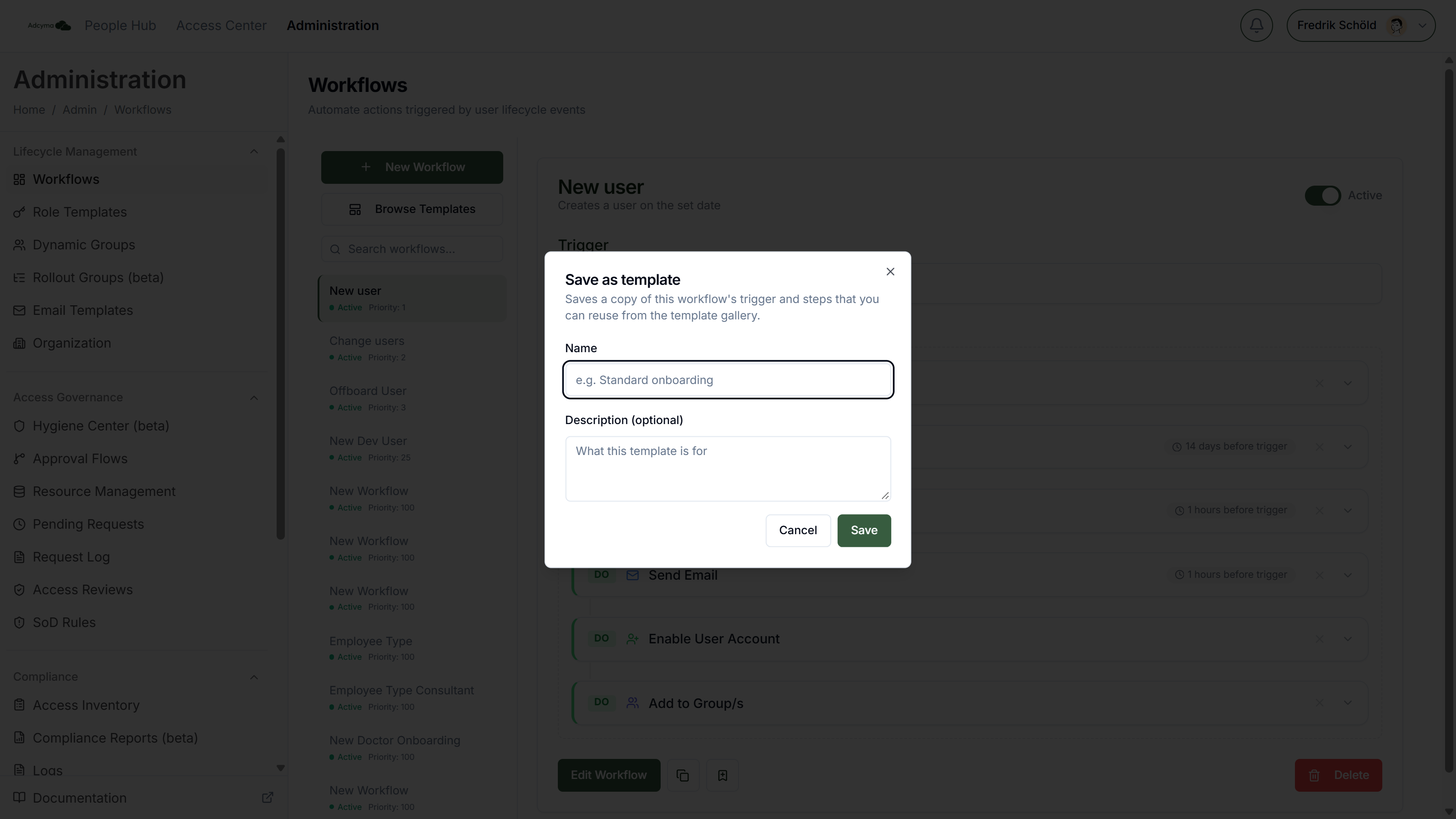
A saved template is a copy of the trigger and steps as they are now, including settings such as groups and email templates. Later changes to the workflow don't update the template. To remove a template, click the bin icon on its card. It is deleted straight away, without a confirmation prompt.
Managing Workflows
Active and Inactive Use the switch in the workflow header. An inactive workflow keeps its setup but isn't used for new requests. Turning a workflow off doesn't cancel steps it has already scheduled. A workflow you create with New Workflow is active as soon as you save it. Workflows from templates and duplicates start inactive.
Duplicate The copy icon creates "name (Copy)" with the same trigger and steps, priority Normal, and switched off so it can't run before you have reviewed it.
Delete Delete removes the workflow after a confirmation. Steps it has already scheduled still run.
Examples
Onboarding for everyone, extra access for Sales
- Workflow 1, priority 1000: New Employee, no conditions. Create User 7 days before the start date, Send Email with a welcome template on the start date, Send Email to the manager 3 days before.
- Workflow 2, priority 1000: New Employee, Department is Sales. Apply Role Template "Sales" 6 days before the start date, so the account already exists.
Offboarding with a mailbox hand-over
- Employee Leaving, no conditions. Disable User Account and Revoke All User Sessions immediately, Set Auto-Reply with
{{ manager_name }}and{{ manager_email }}in the message, Convert to Shared Mailbox after 1 day, Delete User after 30 days.
Department move
- Employee Change, no conditions. Remove from All Groups, then Apply Role Template, then Update User Profile, all immediately and in that order.
Best Practices
- Build one baseline workflow per trigger that applies to everyone. Add routed workflows on top for the exceptions.
- Remember that an Employee Change only updates Entra ID or Active Directory if a matching workflow has an Update User Profile step.
- Give routed workflows a lower priority number than the baseline when they override a run-once step, like an earlier Delete User.
- Pick condition values from the picker. A typo or different casing means the workflow silently doesn't match.
- Use the description field to say who a workflow is for and why.
Troubleshooting
Nothing happened for a new employee
- Check that an active New Employee workflow with a Create User step matches the person. Conditions are case-sensitive.
- Check the task in the People Hub. If Create User failed, the other steps for that person usually fail too, because the account they act on doesn't exist.
An edit didn't reach Entra ID or Active Directory
- Check that an active Employee Change workflow with Update User Profile matches the person.
A step ran with the wrong settings, or didn't run
- Another matching workflow may have won. See When several workflows match.
Mailbox or calendar steps fail
- These steps run through Exchange Online and need the Exchange connection. See Exchange certificate.
- The notification for the failed task includes a recommendation for what to check. See Notifications.